

While Large Language Models (LLMs) like Claude and OpenClaw are powerful productivity boosters, their operating costs can spiral out of control shockingly fast. You’ve likely experienced it: throw an entire project at an AI, and a single complex task can easily burn through tens or even hundreds of thousands of tokens, translating to a daily bill of tens to hundreds of dollars.
The stark reality is that uncontrolled efficiency is unsustainable in business. Having navigated these pitfalls myself—like burning $110 in just five hours on an API—I’ve compiled this guide to help you master cost control. Implement these strategies, and you can realistically slash your token consumption by up to 90%.
01. Understand the Core Billing Logic: Why Costs Explode
Before diving into tactics, you must understand the underlying business logic of how these models bill you.
Think of today’s leading LLMs as “amnesiac geniuses” with terrible short-term memory. When you engage in a long, multi-turn conversation, the cost isn’t linear—it’s exponential.
Here’s why: When you send your 30th message, the AI doesn’t just read that new sentence. It must re-read the entire conversation history—your previous 29 messages, the system prompt, and all loaded tools—to understand the context. It’s like briefing a new employee every single time you give them a new task by reciting the company’s entire ten-year history and meeting minutes. Unsurprisingly, studies show that in long conversations, up to 98.5% of tokens are wasted re-reading this history.
The Core Strategy: Knowing this, our guiding principle is clear: Shorten inputs, clean them up, and break tasks into discrete chunks.
02. Audit First: Know Where Your Money is Going
Most people burn money blindly. The first step to control is visibility. You must know your consumption in real-time.
- Use the
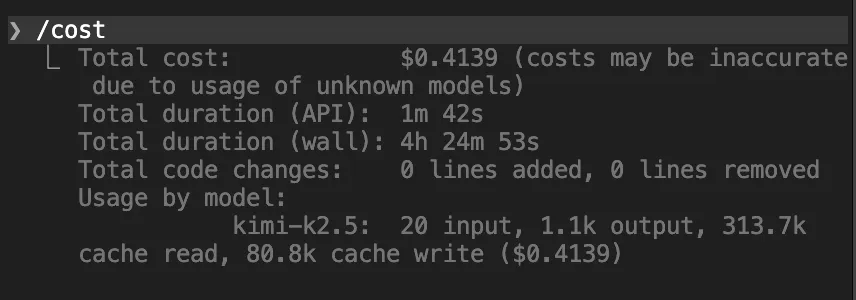
/contextand/costcommands frequently in your terminal (e.g., with Claude Code or OpenClaw)./context — Shows how much of your context window is being used and by what./cost — Shows your precise spend to date. Think of these as X-rays for your AI session, revealing memory bloat and exact costs.
- Ask Your Agent for a “Cost Health Report.” Prompt it: “Analyze my current cost consumption and identify the biggest resource hogs.” It can pinpoint which files are taking up massive space or which repetitive loops are doubling your burn rate. Proactively finding and eliminating these is crucial.
03. Method Two: The Art of AI “Digital Decluttering”
This method is about maintaining “context hygiene”—don’t let the AI’s “brain” fill up with junk. Clean inputs are your first line of defense.
- The 20-Message Hard Reset Since memory gets progressively more expensive, be ruthless about clearing it. If you’ve gone 15-20 rounds on a complex task, command the AI to “summarize all progress and key code so far.” Copy that summary, use
/clearto start a fresh session, and paste the summary back in. Working with a clean slate is often dozens of times cheaper than continuing in a long, cluttered conversation. Always clear the history when switching tasks. - Filter Terminal Noise When you run code tests (
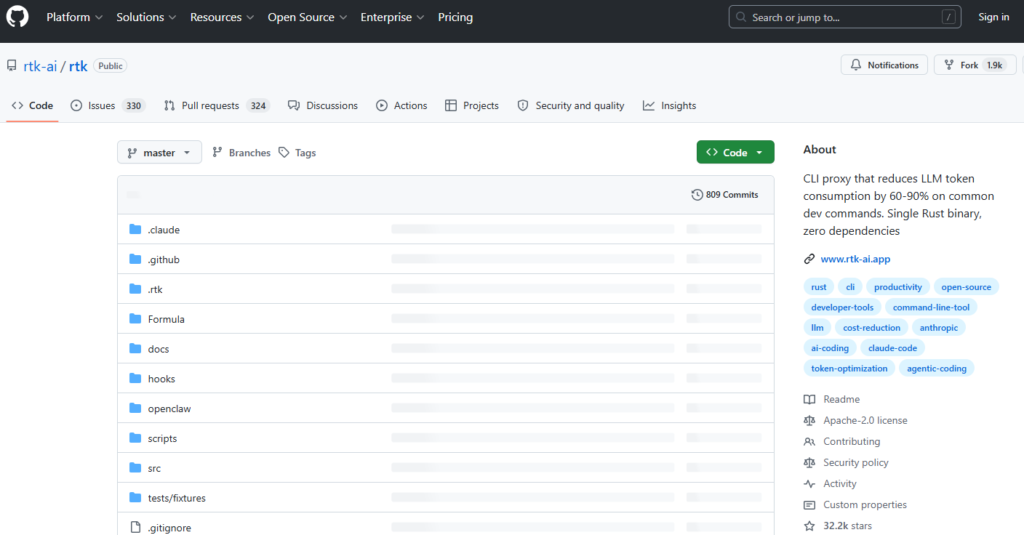
git status,cargo test), the terminal often spits out thousands of lines of logs. Having the AI read all that is pure waste. I strongly recommend installing a small tool called RTK (Rust Token Killer). It filters out empty lines and noise from error outputs before feeding them to the AI, potentially saving up to 90% on terminal-related consumption.- GitHub: https://github.com/rtk-ai/rtk
- Streamline Your “System Manual” Don’t write your
.mdinstruction files like encyclopedias. Keep them under 200 lines. Treat them as a “table of contents” or index, telling the AI _where_to find information, not dumping it all in. A concise prompt is a cheaper prompt.
04. Method Three: Break the “Text-Message” Habit
Many users interact with AI like they’re sending rapid-fire text messages—one thought per message. Each new message forces the AI to re-chew the entire history, burning tokens for no reason.
- Wrong: “That’s wrong!” -> “I meant the second paragraph above!” -> Each message retriggers a full context reload.
- Right: Use the ‘Edit’ function. Go back to the prompt where the error occurred, edit it directly, and regenerate. This overwrites the old message, preventing infinite context stacking.
- Wrong: “Summarize this article.” -> “Now give it a title.” -> “List three key points.”
- Right: Bundle requests. “Summarize this article, list three key points, and propose a title.” One prompt, three results. You just saved 2x the tokens.
05. Method Four: Shut Down Idle Tools & Kill “Silent Bills”
Tools and plugins come with very expensive “silent bills”—their instruction manuals.
- Disable Unused MCP Servers & Trim Default Files Every MCP Server you enable loads its entire tool definition into the context for every single message. A single server can consume ~18,000 tokens per message.
- Best Practice: Disconnect unneeded MCPs at the start of each session.
- Use CLI over MCP: If a command-line tool can do it, use that instead of an MCP plugin (e.g., use the Feishu CLI instead of its MCP).
agent.md,user.md, etc.) on initialization. Even when idle, these can occupy ~6k tokens.- Solution: For simple tasks, empty these files or configure your setup not to create them.
- Enable Plan Mode & Break Dead Loops The biggest token waste often comes from the AI going down a wrong path or getting stuck in a bug-fixing loop.
- The 95% Confidence Rule: Write into your system prompt: “Do not make any changes until you are 95% confident about what needs to be built. You must keep asking me questions until you reach that confidence level.”
- Stop the Bleeding: If the AI is stuck re-reading the same files or caught in an error loop, interrupt it immediately! In such loops, 80% of tokens can generate zero value.
- Exploit “Off-Peak” Quotas If you use a monthly quota from a major provider, be aware of “peak” and “off-peak” compute allocation. Your quota burns faster during peak hours (e.g., 8 AM – 2 PM EST on weekdays). Schedule heavy, token-intensive tasks like major refactors or multi-agent collaborations for off-peak times (afternoons, evenings, weekends).
06. Method Five: Specialize Your Agents
A smart business owner doesn’t pay a CEO’s salary to sweep floors. Don’t use your most expensive model (Claude Opus) for every single job.
- Create Dedicated Workspaces Don’t use one “omni-agent” for everything. Create specialized agents: a “Writing Agent,” a “Coding Agent,” etc. Give them separate memory and workspaces so their contexts don’t pollute each other, drastically reducing what needs to be loaded.
- Implement a Model Downgrade Strategy
- Complex Architecture Design: Use flagship models (Claude Opus, GPT-4o).
- Simple Data Wrangling / Frontend Work: Use lighter, cheaper models (Haiku, Gemini Flash, or even capable domestic models).
- Use Local Models for “Heartbeat” Tasks Many agents have “heartbeat mechanisms” that periodically check if tasks are done. Never use a cloud model for these menial, recurring triggers. Run a small, free, open-source model locally (e.g., via Ollama) to handle these pings and save a fortune on polling costs.
07. Method Six: Leverage Subscription Models
If you’re a heavy user, avoid traditional pay-per-token API billing at all costs.
- Maximize Subscription Value (OAuth Integration) If you already pay for a $20/month subscription (ChatGPT Plus, Claude Pro, Gemini Advanced), you can often use OAuth to connect these subscriptions to your local agent, bypassing extra API token fees entirely. (Note: Some platforms, like Claude, may restrict this for OpenClaw).
- Embrace Coding Plans (Monthly Bundles) Many providers now offer “Coding Plans”—monthly bundles of requests specifically for coding tools. For a few dollars or tens of RMB, you get thousands of requests, effectively bringing your per-request cost down to one-fifth or even one-tenth of standard API pricing.
Your 6-Step Action Plan to Master AI Cost Control
The Bottom Line: AI tools are incredibly powerful, but without understanding the underlying operational logic, you’re just fodder for the algorithm. Internalize these six core methods:
- Audit Religiously: Use
/contextand/costfor constant visibility. - Practice Context Hygiene: Enforce the 20-message reset, filter terminal noise, streamline prompts.
- Fix Bad Habits: Use the edit button, bundle your questions.
- Kill Silent Bills: Disable unused MCPs, break dead loops, schedule for off-peak.
- Specialize: Use dedicated agents, downgrade models, run heartbeats locally.
- Go for Subscriptions: Use OAuth and monthly coding plans.
Make these practices second nature. Whether you’re using Claude, OpenClaw, or any other AI platform, you’ll be able to unlock maximum productivity at minimum cost.